













Hubstaff vs TimeCamp: pricing and verdict

Hubstaff is better if you need remote-team oversight, attendance context, or payroll-related workflows. TimeCamp is better if you want flexible time tracking and reporting without as much operational weight.
Hubstaff and TimeCamp both go beyond a simple timer, but they do it in different ways. Hubstaff leans toward oversight and operations. TimeCamp leans toward flexible tracking and reporting.
That means this comparison is really about how much structure and visibility your team needs around tracked time. Some teams need more oversight. Others just need better reporting.
Hubstaff vs TimeCamp at a glance
Use this table if you want the main difference quickly.
| Feature | Hubstaff | TimeCamp |
|---|---|---|
| Best for | Remote teams that need oversight and payroll-adjacent workflows | Teams that want flexible tracking and reporting |
| Core approach | Operational time tracking and workforce visibility | Flexible timer and reporting system with lighter oversight |
| Main strength | Attendance, oversight, and operations context | Reporting depth and tracking flexibility |
| Learning curve | Medium | Low to medium |
| Pricing model | Small free plan, then per-user tiers | Freemium, then per-user tiers |
| Better fit | Managed remote operations | Reporting-focused teams |
Quick verdict: Hubstaff vs TimeCamp
Hubstaff is the stronger option when your team needs more oversight and operational structure. TimeCamp is the stronger option when your team just wants richer tracking and reporting without that same monitoring feel.
Choose Hubstaff if:
- You manage distributed teams with attendance and payroll workflows.
- You need more oversight than a normal tracker gives you.
- You want operations and time data closer together.
Choose TimeCamp if:
- You want strong tracking and reporting without a monitoring-first feel.
- You need flexible timer and manual entry workflows.
- You care more about reports than workforce oversight.
Choose Timen if:
- You want a simpler workflow than either tool.
- You want calendar review, reports, and invoicing.
- You do not want the product to feel operational or heavy.
Key differences between Hubstaff and TimeCamp
The biggest difference is how much oversight each tool brings to the table. Hubstaff is closer to a workforce operations tool. TimeCamp is closer to a flexible time tracker with strong reporting.
That changes how the tool feels every day. Hubstaff often makes more sense when management needs visibility into a remote team's work patterns. TimeCamp often makes more sense when the goal is simply better time data and exports.
Some teams need that extra oversight. Many do not. That is why the better pick here depends so much on team culture and workflow.
What is Hubstaff?
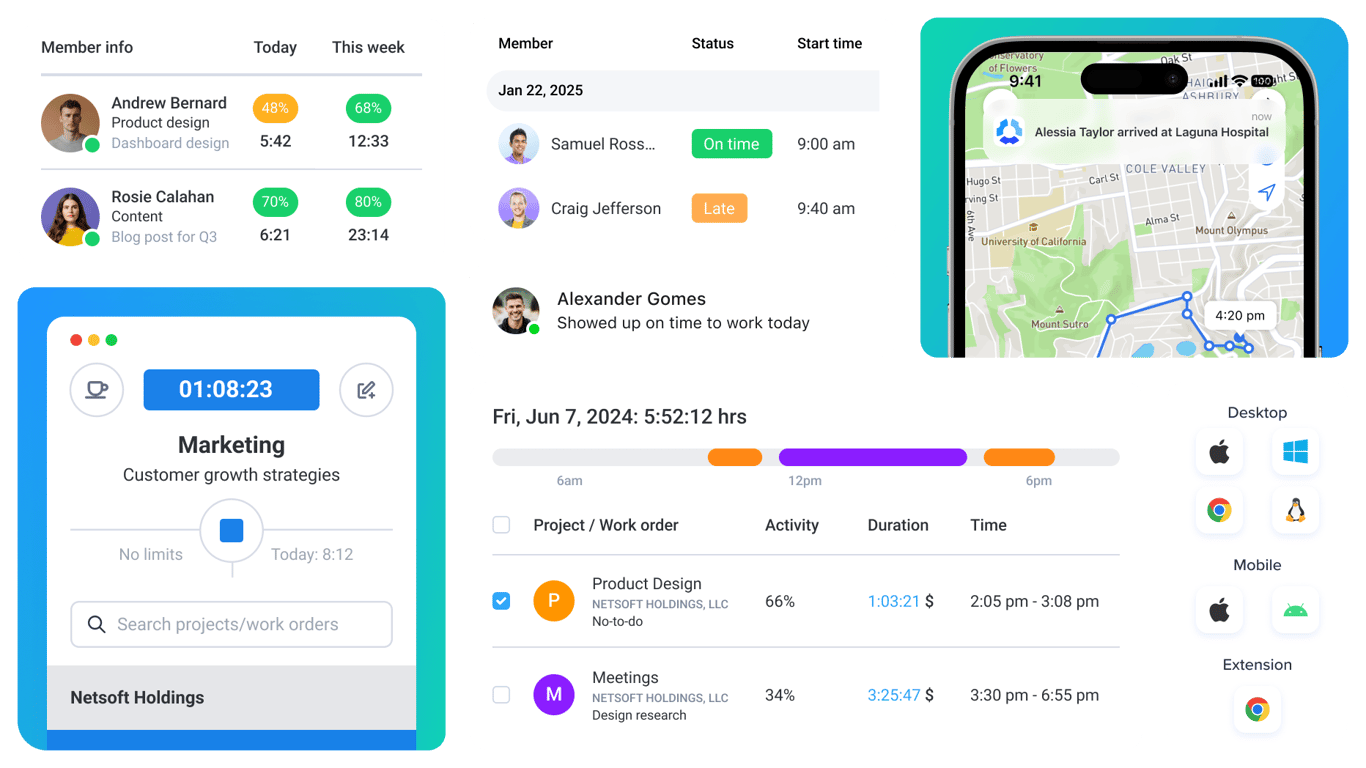
Hubstaff is a time tracking platform built for remote and operational teams. It combines time logging with attendance, team activity visibility, and payroll-related workflows.
That makes it more structured than simpler trackers. For some teams, that structure is useful. For others, it can feel like too much tool for a basic tracking job.
The tradeoff is exactly that weight. Hubstaff works best when the extra operational layer is part of what you actually need.
What users say about Hubstaff
Reviews on G2 and Capterra often praise Hubstaff for remote-team visibility, payroll support, and operational reporting. The common downside is that some teams find the product too monitoring-heavy or more structured than they want.
Source: G2 reviews and Capterra reviews
What is TimeCamp?
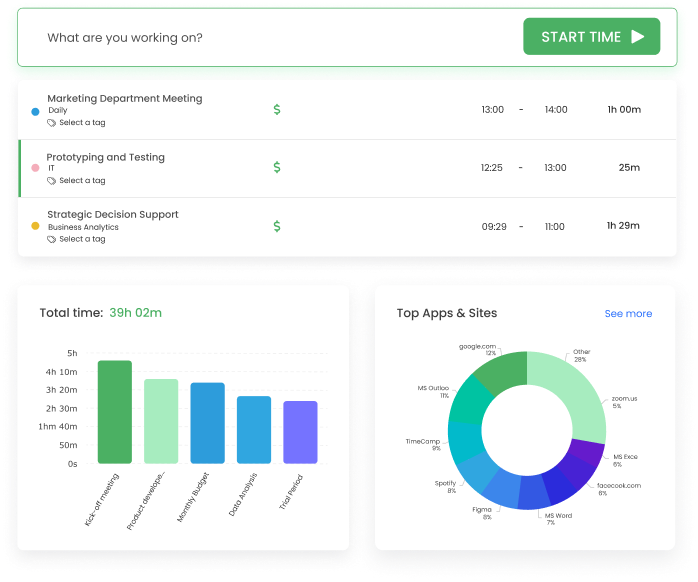
TimeCamp is a time tracking tool that gives teams more flexibility and reporting depth than a basic timer, without pushing quite as far into oversight as Hubstaff.
It is a good fit for teams that want different ways to capture time and more reporting options, but do not want the product to feel like a workforce management tool.
The tradeoff is that it is a little less specialized if your team needs the operational side of time data for attendance or payroll workflows.
What users say about TimeCamp
Reviews on G2 and Capterra often say TimeCamp is flexible and good for teams that want more than a simple timer. The usual downside is that it can still feel busy if your needs are basic, and it is not as operationally focused as Hubstaff.
Source: G2 reviews and Capterra reviews
Hubstaff vs TimeCamp features
Both tools do more than timer tracking. The question is which kind of extra depth matters more to your team.
| Area | Hubstaff | TimeCamp |
|---|---|---|
| Task management | Light task structure with stronger workforce context | Light project structure with flexible categorization |
| Project views | Team activity, attendance, schedules, and reports | Projects, reports, and tracking breakdowns |
| Automation | Stronger around attendance and operations workflows | Flexible timer and categorization workflows |
| Reporting | Strong operational reporting | Strong tracking and reporting depth |
| Communication | Limited collaboration, more management context | Limited collaboration, more neutral tracking focus |
| Integrations | Useful operational and payroll-related ecosystem | Useful PM and reporting ecosystem |
Hubstaff wins when time tracking is part of running a distributed operation. TimeCamp wins when time tracking is mostly about improving reporting and accountability without going deep into monitoring.
That is why teams often react strongly to one or the other. The better tool depends on how much management structure people are comfortable with.
Hubstaff vs TimeCamp pricing
| Plan detail | Hubstaff | TimeCamp |
|---|---|---|
| Free plan | Limited free plan for 1 user | Free plan available |
| Entry paid plan | Starter from $4.99 per user/month billed annually, or $7 billed monthly | Starter from $3.99 per user/month billed annually, or $4.99 billed monthly |
| Higher paid plan | Team from $10 per user/month billed annually, or $12 billed monthly | Premium from $6.99 per user/month billed annually, or $8.99 billed monthly |
| Pricing model | Small free plan, then per-user tiers | Freemium, then per-user tiers |
| Best budget fit | Teams that need operations features | Teams that mainly need tracking and reports |
TimeCamp is usually the easier budget choice. Hubstaff costs more once you move into the plans that unlock the stronger operational side of the product.
Still, if those operational features replace other work or tools for your team, Hubstaff can make sense. This is one of those comparisons where the cheaper tool is not automatically the better value.
Hubstaff vs TimeCamp ease of use
TimeCamp is easier if your team mainly wants tracking and reports. Hubstaff becomes easier only when the team actually needs its extra structure, because otherwise the product can feel heavier than necessary.
So the easier tool is mostly the one that matches your team's tolerance for management structure. If you do not need that structure, TimeCamp is the safer choice.
Hubstaff pros and cons
Hubstaff pros
- Strong remote-team oversight.
- Useful attendance and payroll-related workflows.
- Good fit for operational reporting.
- Practical for structured remote teams.
Hubstaff cons
- Can feel too monitoring-heavy for some teams.
- Heavier workflow than a normal tracker.
- Costs more once advanced plans are needed.
- Not ideal if you just want simple tracking.
Hubstaff is a better fit when management visibility is part of the product requirement, not a side effect.
TimeCamp pros and cons
TimeCamp pros
- Flexible tracking styles.
- Strong reporting for the price.
- Lighter feel than Hubstaff.
- Good fit for teams that want more than a simple timer.
TimeCamp cons
- Can still feel busy for very small teams.
- Less specialized for remote-team operations.
- Not as clear a fit for payroll workflows.
- Some teams may still want an even simpler tool.
TimeCamp is strongest when the goal is better tracking and reporting, not deeper workforce oversight.
Timen as an alternative
Timen is a good alternative if both Hubstaff and TimeCamp feel heavier than you want. It keeps the workflow simple, gives you a calendar view, and still covers reports and invoicing.

That makes it a better fit for teams that want clear time tracking without carrying around a more operational product than they need. It is especially useful when trust and simplicity matter, including for finance teams that only need usable reporting.
If your team wants time data without feeling watched or buried in settings, Timen is easier to live with.
If remote-team oversight is still part of the decision, Clockify vs Hubstaff gives you another way to look at Hubstaff from a simpler tracking angle. If you are also comparing billing-first workflows, Harvest vs Everhour is a useful follow-up. If the real issue is workflow drag, see software slowdown. If the trust-based Timen angle matters more, compare Timen vs Hubstaff.
You can also review the best Hubstaff alternatives, the best TimeCamp alternatives, or browse more compare articles if you want a broader shortlist.
Which tool should you choose?
Choose Hubstaff if:
- You need remote-team oversight and operational structure.
- You care about attendance or payroll-related workflows.
- You want time data tied closely to management visibility.
Choose TimeCamp if:
- You want flexible tracking and stronger reporting.
- You do not need a monitoring-heavy product.
- You want the lower-cost option for reporting-focused teams.
Choose Timen if:
- You want a simpler workflow than both.
- You want calendar review, clear reports, and invoicing.
- You want time tracking to feel calmer and lighter.
Hubstaff is the better operations tool. TimeCamp is the better reporting-focused tracker. Timen is the simpler alternative.
FAQ
Here are the most common questions people ask when comparing Hubstaff and TimeCamp.
- Is Hubstaff better than TimeCamp?
- Hubstaff is better if you need remote-team oversight and workforce structure. TimeCamp is better if you mainly want flexible tracking and reporting.
- Which tool is easier to use, Hubstaff or TimeCamp?
- TimeCamp is easier for most tracking-focused teams. Hubstaff is easier to justify only when its extra operational features are truly needed.
- Which tool is cheaper, Hubstaff or TimeCamp?
- TimeCamp usually starts lower and stays easier to justify on price. Hubstaff can still be worth more for teams that need its operations features.
- Is there a simpler alternative to Hubstaff and TimeCamp?
- Timen is a simpler alternative if you want clean tracking, calendar review, reports, and invoicing without a heavier operational feel.