













Toggl Track vs Harvest: pricing and verdict

Toggl Track is better if you want a cleaner, lighter time tracker that people can start using right away. Harvest is better if your team needs time tracking tied closely to budgets, billable hours, and invoices.
Choosing between Toggl Track and Harvest usually comes down to what happens after the timer stops. Toggl Track focuses on making daily tracking easy. Harvest still feels approachable, but it leans more into client work, billing, and the money side of tracked time.
This guide compares Toggl Track vs Harvest on features, pricing, ease of use, pros and cons, and the kind of team each tool fits best. If you want something simpler than Harvest but more billing-friendly than a basic timer, Timen is also worth a look.
Toggl Track vs Harvest at a glance
If you want the fast summary first, this table shows the main difference in one view.
| Feature | Toggl Track | Harvest |
|---|---|---|
| Best for | Freelancers and teams that want simple daily tracking | Agencies, consultancies, and teams that bill for time |
| Core approach | Clean timer-first tracking with light project structure | Time tracking connected to budgets, rates, and invoices |
| Main strength | Low-friction logging that people actually keep using | Strong billing workflow from tracked time to invoice |
| Learning curve | Low - very easy to start | Low to medium - easy, but more settings around billing |
| Pricing model | Freemium, then per-user paid plans | Limited free plan, then per-user paid plans |
| Better fit | Teams that care most about fast tracking and simple reports | Teams that care most about billable hours and invoicing |
Quick verdict: Toggl Track vs Harvest
Neither tool is trying to be everything. Toggl Track wins on simplicity. Harvest wins when time tracking is part of a client billing workflow.
Choose Toggl Track if:
- You want the easiest day-to-day tracking experience.
- Your team mostly needs timers, timesheets, and reports.
- You want a more generous free starting point.
Choose Harvest if:
- You send invoices based on tracked time.
- You need budgets, billable rates, and client-facing reporting.
- You want less app-switching between tracking and billing.
Choose Timen if:
- You want a simple timer and quick edits, but still care about invoicing.
- You like seeing your time inside a calendar view.
- You want straightforward pricing without many plan jumps.
Key differences between Toggl Track and Harvest
The biggest difference is what each product treats as the center of the workflow. Toggl Track starts from the timer. Harvest starts from the project and the client. Both track time well, but they point you in slightly different directions once that time needs to be reviewed or billed.
That matters because teams often outgrow a pure tracker before they outgrow the timer itself. If the real job is getting time approved, watching a project budget, and invoicing clients, Harvest gives you more of that in one place. If the real job is just getting everyone to track time consistently, Toggl Track usually feels easier.
There is also a mindset difference. Toggl Track feels lighter and more individual. Harvest feels a little more operational. Neither approach is wrong, but they suit different teams.
What is Toggl Track?
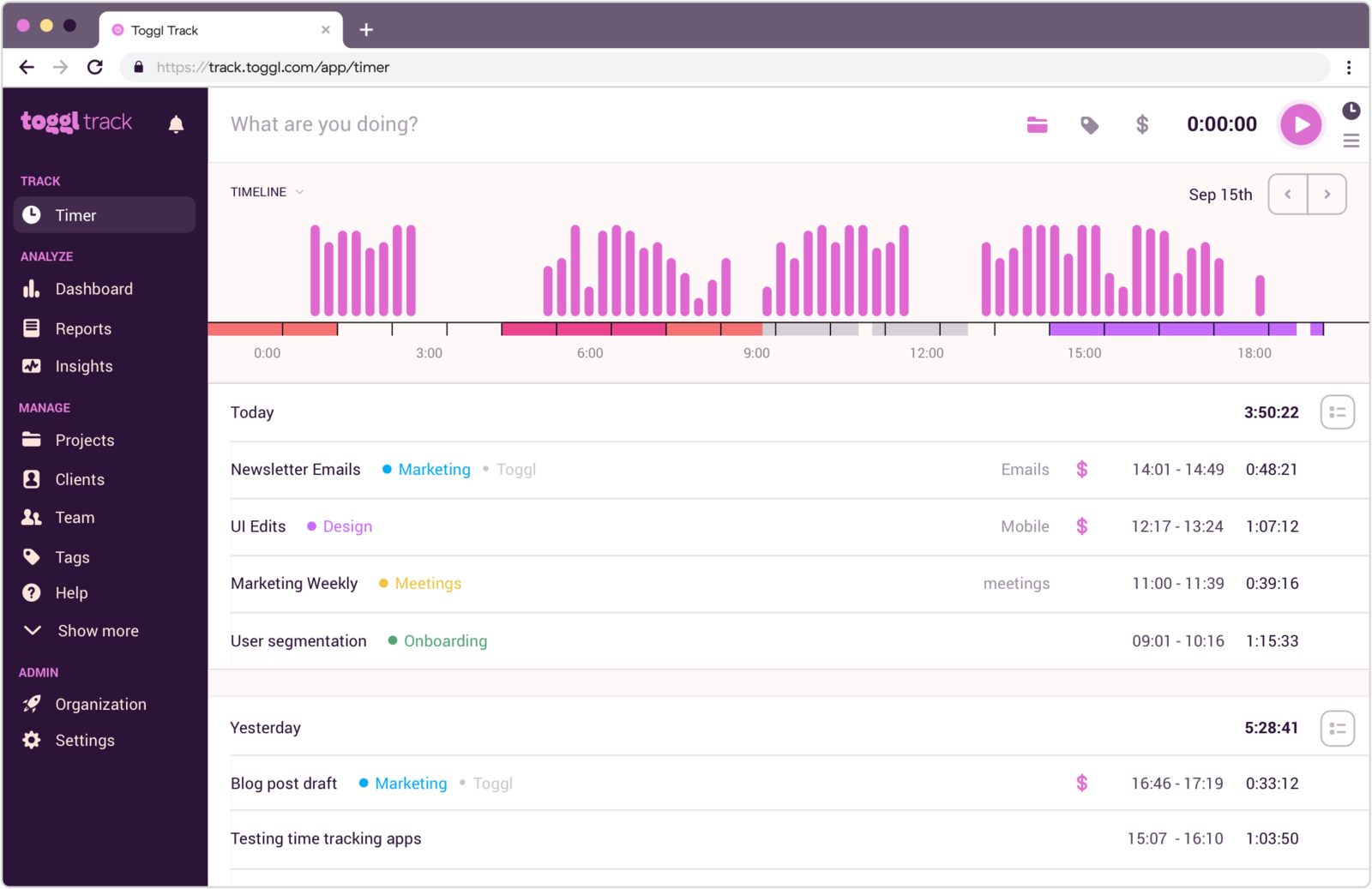
Toggl Track is a time tracking tool built around fast logging. It is popular with freelancers, agencies, and small teams because people can start using it without much setup.
Its strongest features are the timer, manual time entry, basic project organization, reminders, and reporting. It also connects with many other tools, which helps when your work already lives elsewhere.
The tradeoff is that Toggl Track feels lighter once you need deeper billing workflows or more operational controls. You can do a lot with it, but it is still a tracker first.
What users say about Toggl Track
Reviews on G2 and Capterra usually describe Toggl Track as easy to learn, easy to keep using, and less cluttered than heavier tools. The common complaints are that advanced reporting, approvals, and admin controls can feel limited unless you move up the pricing ladder.
Source: G2 reviews and Capterra reviews
What is Harvest?
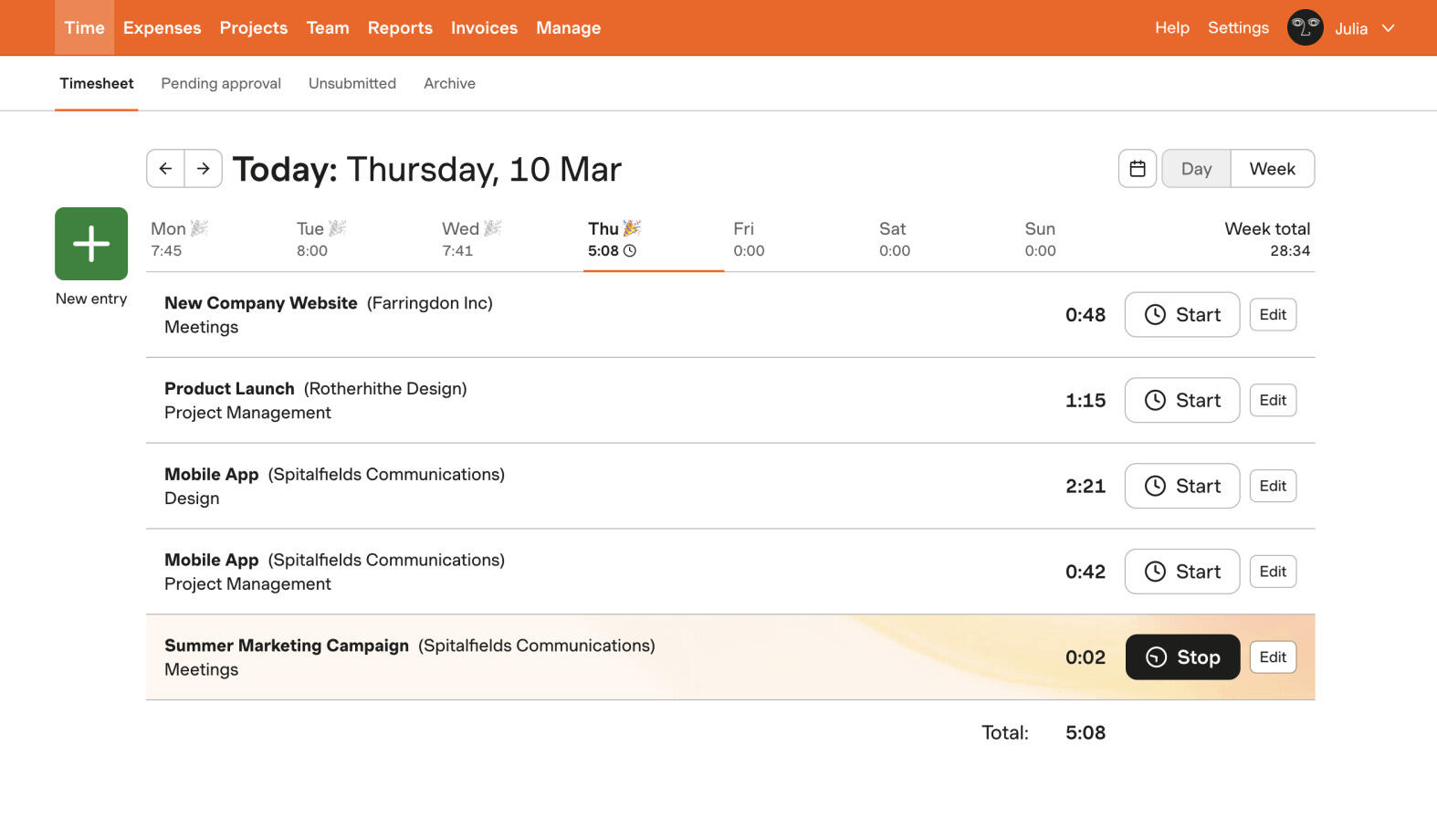
Harvest is a time tracking and invoicing tool aimed at teams that charge for their time. It is especially common in agencies, consultancies, and service businesses.
What makes Harvest attractive is how closely time entries connect to billable rates, budgets, expenses, and invoices. For client work, that can remove a lot of manual steps.
The tradeoff is that Harvest can feel like more tool than you need if your team only wants a simple timer and reports. It is still easy to use, but it is not as stripped back as Toggl Track.
What users say about Harvest
Reviews on G2 and Capterra often praise Harvest for being clear, dependable, and especially useful for billable client work. The recurring downside is that teams wanting a cheaper baseline or more flexible project views sometimes feel boxed in by the pricing and workflow.
Source: G2 reviews and Capterra reviews
Toggl Track vs Harvest features
Both tools cover timers, timesheets, reports, and integrations. The difference is how much they wrap around those basics.
| Area | Toggl Track | Harvest |
|---|---|---|
| Task management | Light project and client structure, but not a full task system | Project and task support tied more closely to budgets and billable work |
| Project views | Simple project lists, timers, and reports | Project budgets, time summaries, and invoice-ready project tracking |
| Automation | Reminders, idle detection, and light admin helpers | Less about automation, more about built-in billing workflow |
| Reporting | Strong time reports with filters and exports | Strong time and budget reporting with client billing context |
| Communication | Limited collaboration features inside the tracker | Also limited, but stronger around project and client context |
| Integrations | Wide integration ecosystem | Good integrations, especially for accounting and project tools |
Toggl Track wins if your main priority is keeping time tracking quick and consistent. It is easier to roll out when the team just wants to hit start, stop, and move on.
Harvest wins if tracked time directly affects budgets or invoices. The tool does not feel dramatically more complex, but it does ask you to work a little more inside its project and billing structure.
Toggl Track vs Harvest pricing
| Plan detail | Toggl Track | Harvest |
|---|---|---|
| Free plan | Free for up to 5 users with core tracking features | Free for 1 seat and 2 projects |
| Entry paid plan | Starter from $9 per user/month billed annually, or $10 billed monthly | Pro from $11 per seat/month billed annually, or $13.75 billed monthly |
| Higher paid plan | Premium from $18 per user/month billed annually, or $20 billed monthly | Premium from $14 per seat/month billed annually, or $17.50 billed monthly |
| Pricing model | Freemium, then per-user tiers | Small free plan, then per-user tiers |
| Best budget fit | Small teams that want a cheaper starting point | Teams that will actually use invoicing and billable features |
On paper, Toggl Track is usually the easier entry point. The free plan is more generous, and the first paid tier stays slightly lower than Harvest. That matters if your team mainly wants tracking and reports.
Harvest can still be the better value if client billing is central to your workflow. Paying a little more makes more sense when the tool replaces part of your invoicing process instead of only your timer.
Toggl Track vs Harvest ease of use
Toggl Track is easier for most people on day one. The product feels built around the idea that time tracking should take as little attention as possible. That makes adoption simpler, especially for small teams or mixed-discipline teams that do not love admin work.
Harvest is still friendly, but it is a little more structured because billing is part of the product. If your team needs that structure, it feels helpful. If not, Toggl Track usually feels lighter and faster.
Toggl Track pros and cons
Toggl Track pros
- Very easy to learn and roll out.
- Generous free plan for small teams.
- Clean interface that stays focused on tracking.
- Good reporting and broad integrations.
Toggl Track cons
- Billing workflow is not as strong as Harvest.
- Project structure is fairly light.
- More advanced controls sit behind higher plans.
- Not ideal if you need time tracking tied tightly to finance.
Toggl Track makes the most sense when easy adoption matters more than workflow depth. It is a strong default if your team does not want much overhead.
Harvest pros and cons
Harvest pros
- Time, budgets, and invoicing work well together.
- Strong fit for agencies and client service teams.
- Reports are easy to turn into billing conversations.
- Still fairly easy to use despite the extra structure.
Harvest cons
- Free plan is very limited.
- Less appealing if you do not need invoicing.
- Not the cheapest option once teams grow.
- Project and workflow views are narrower than PM-first tools.
Harvest is the better fit when tracked time is tied directly to revenue. If that is not true for your team, part of the product may go unused.
Timen as an alternative
Timen fits between these two tools in a useful way. It keeps daily tracking light and easy, but it also gives teams a cleaner path to reports, calendar-based review, and invoicing.

That makes Timen a good option for teams that like Toggl Track's simplicity but want a little more context around their time, or for teams that like Harvest's billing angle but do not want the product to feel as operational. It is a particularly useful middle ground for agencies.
It is also easier to understand from a pricing point of view. Instead of working through several feature tiers, you get a simpler setup with the core workflow already in place.
If Harvest is still on your shortlist, Clockify vs Harvest gives you a more budget-focused comparison. If Toggl Track still feels like the baseline, Toggl Track vs Clockify helps you compare it with another popular lightweight option. That decision also changes when the issue is less the timer tradeoff and more relying on Harvest long term. If you want the direct Timen comparison on the simpler side, open Timen vs Toggl Track.
You can also look through the best Toggl Track alternatives, the best Harvest alternatives, compare the lighter all-in-one option in Timen vs Harvest, or browse more compare articles if you want to keep narrowing the list. If the bigger question is whether Toggl itself is still too much, moving to a simpler workflow is the better follow-up.
Which tool should you choose?
Choose Toggl Track if:
- You want the cleanest experience for daily time logging.
- You need a free plan for a small team.
- You do not need invoicing to sit inside the tracker.
Choose Harvest if:
- You invoice clients from tracked time.
- You manage budgets and billable rates every week.
- You want billing workflow built in, not added around the tracker.
Choose Timen if:
- You want simple tracking, but you still need reports and invoices.
- You want a calendar view that makes time easier to review.
- You want a lighter product than Harvest without falling back to a bare timer.
For most teams, the decision is simple. Pick Toggl Track if simplicity is the main goal. Pick Harvest if billing is the main goal. Pick Timen if you want a calmer middle ground.
FAQ
Here are the most common questions people ask when comparing Toggl Track and Harvest.
- Is Toggl Track better than Harvest?
- Toggl Track is usually better for pure time tracking simplicity. Harvest is usually better for teams that need billing, budgets, and invoices built into the workflow.
- Which tool is easier to use, Toggl Track or Harvest?
- Toggl Track is easier for most people to start with. Harvest stays approachable, but it asks you to care more about rates, projects, and billable work.
- Which tool is cheaper, Toggl Track or Harvest?
- Toggl Track is cheaper at the starting point and has the more generous free plan. Harvest can be better value if its billing workflow replaces extra admin work for your team.
- Is there a simpler alternative to Toggl Track and Harvest?
- Timen is a simpler alternative if you want fast tracking, a calendar view, clear reports, and invoicing without moving into a heavier setup.