













Clockify vs Harvest: pricing and verdict

Clockify is better if you want lower-cost team time tracking with a generous free plan. Harvest is better if your team needs tracked time to flow naturally into budgets, billable work, and invoices.
Clockify and Harvest are not direct twins even though both track time. Clockify is the cheaper, broader team timesheet option. Harvest is the more billing-oriented option for service work.
So the real question is not just which timer is better. It is whether your workflow stops at reporting, or whether it needs to continue all the way into budgets and invoices.
Clockify vs Harvest at a glance
This is the fast summary if you want the main tradeoff without reading every section.
| Feature | Clockify | Harvest |
|---|---|---|
| Best for | Budget-conscious teams that need broad timesheet coverage | Client service teams that bill from tracked time |
| Core approach | Tracking and admin controls for teams | Tracking connected to budgets, rates, and invoices |
| Main strength | Value for larger teams | Stronger billing workflow |
| Learning curve | Low to medium | Low to medium |
| Pricing model | Freemium, then low-cost per-user tiers | Limited free plan, then per-user tiers |
| Better fit | Internal teams and cost-sensitive rollouts | Agencies and consulting teams |
Quick verdict: Clockify vs Harvest
Clockify is the practical budget choice. Harvest is the workflow choice if invoicing and client billing sit at the center of your process.
Choose Clockify if:
- You need a generous free plan or lower paid pricing.
- You need many people to log time consistently.
- You do not need invoicing to be part of the core product.
Choose Harvest if:
- You bill clients from tracked time.
- You care about budgets and billable rates every week.
- You want fewer handoffs between tracking and invoicing.
Choose Timen if:
- You want something simpler than both.
- You want a calendar view to review time more easily.
- You want invoicing, but not a heavy billing-first workflow.
Key differences between Clockify and Harvest
The biggest difference is intent. Clockify is trying to give teams wide coverage at a strong price. Harvest is trying to help client-service teams move cleanly from time entry to billing.
That means Clockify often makes more sense for internal teams, operations teams, or any company that mostly needs consistent time data. Harvest makes more sense when the time itself drives invoices or project budgets.
There is also a feel difference. Clockify feels more admin-oriented. Harvest feels more client-work oriented.
What is Clockify?
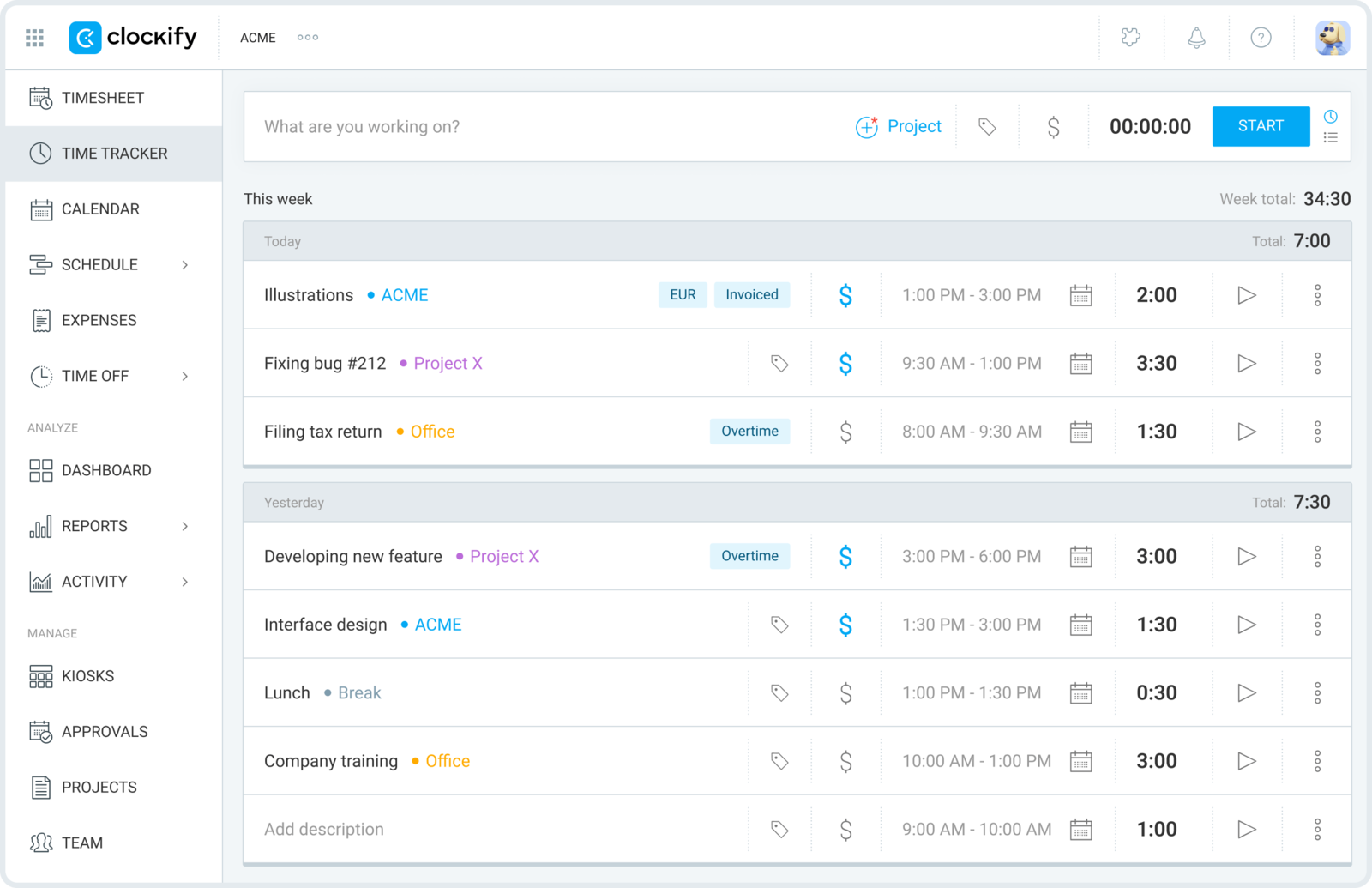
Clockify is a time tracking tool built to work for teams at scale. Its main appeal is that you get a lot of team coverage before the price starts to climb.
That includes timers, timesheets, reports, approvals, and admin controls. It is a practical pick when time tracking needs to be standardized across many people.
The tradeoff is that it can feel more functional than refined. It does the job well, but it is not the calmest product in the category.
What users say about Clockify
Reviews on G2 and Capterra often say Clockify offers a lot of value for the price and is especially useful when many people need to track time. The common complaints are around interface polish and parts of the product feeling more practical than pleasant.
Source: G2 reviews and Capterra reviews
What is Harvest?
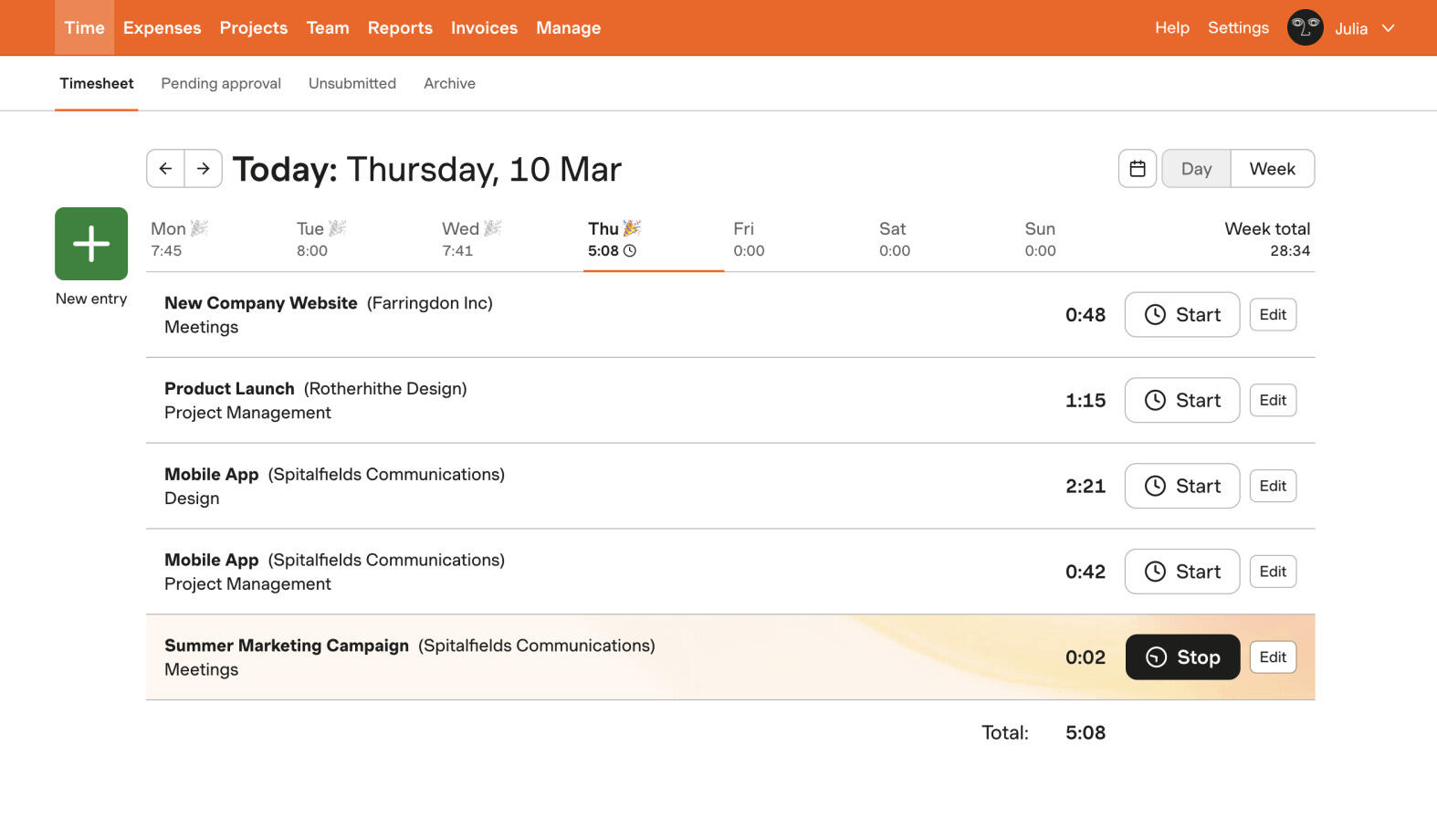
Harvest is a time tracking and invoicing tool that fits teams doing client work. It is built around the idea that tracked time should help with budgets, billable hours, and invoices right away.
That is why Harvest often feels stronger for agencies and consultancies than simpler trackers. It is less about just recording time and more about using time as business data.
The tradeoff is cost and focus. If you do not need the billing side, part of the product may feel unnecessary.
What users say about Harvest
Reviews on G2 and Capterra usually praise Harvest for being clear and dependable for billable work. The common downside is that it can feel expensive or too specific if your workflow does not actually need invoicing in the tool.
Source: G2 reviews and Capterra reviews
Clockify vs Harvest features
Both tools overlap on the basics, but they become different products once you look beyond the timer.
| Area | Clockify | Harvest |
|---|---|---|
| Task management | Light task and project structure with stronger team admin | Project and task support tied closely to budgets and billable work |
| Project views | Timesheets, dashboards, reports, and admin views | Budget views, billable time summaries, and invoice-ready project context |
| Automation | Approvals, reminders, and workflow controls | Less automation, but a stronger built-in billing path |
| Reporting | Strong for broad team reporting | Strong for billable reporting and client work |
| Communication | Limited built-in collaboration | Limited built-in collaboration |
| Integrations | Broad ecosystem | Good ecosystem, especially for accounting and PM tools |
Clockify wins when you need general team coverage at a strong price. Harvest wins when time tracking needs to feed directly into client billing decisions.
That is why many internal teams land on Clockify, while agencies and consultancies still lean toward Harvest.
Clockify vs Harvest pricing
| Plan detail | Clockify | Harvest |
|---|---|---|
| Free plan | Free for up to 5 users | Free for 1 seat and 2 projects |
| Entry paid plan | Standard from $5.49 per user/month billed annually, or $6.99 billed monthly | Pro from $11 per seat/month billed annually, or $13.75 billed monthly |
| Higher paid plan | Pro from $7.99 per user/month billed annually, or $9.99 billed monthly | Premium from $14 per seat/month billed annually, or $17.50 billed monthly |
| Pricing model | Freemium, then per-user tiers | Limited free plan, then per-user tiers |
| Best budget fit | Larger or cost-sensitive teams | Teams that need billing built in |
Clockify is clearly cheaper if you only need tracking and reporting. Harvest becomes easier to justify once billing and budgets are core to your workflow.
That means the cheaper tool depends on what you would otherwise need to add around it. Harvest costs more, but it may replace extra invoicing steps.
Clockify vs Harvest ease of use
Neither tool is difficult, but they feel different. Clockify can take a little longer to feel tidy because it exposes more admin-style options. Harvest often feels clearer if your team already thinks in terms of clients, rates, and billable work.
If your workflow is simple, Clockify may feel like more surface area than you need. If your workflow is client-billing heavy, Harvest often feels more natural.
Clockify pros and cons
Clockify pros
- Excellent free plan.
- Lower paid pricing.
- Good team-wide coverage and admin controls.
- Strong value as teams grow.
Clockify cons
- Interface feels more utilitarian.
- Less natural for client invoicing.
- Can feel busy for small teams.
- Not as calm or focused as lighter tools.
Clockify is strongest when cost and broad team adoption matter more than polish.
Harvest pros and cons
Harvest pros
- Strong link between time, budgets, and invoices.
- Good fit for client-service businesses.
- Clear reporting for billable work.
- Easy to explain to non-technical teams.
Harvest cons
- Free plan is limited.
- More expensive than Clockify.
- Less attractive if you do not need invoicing.
- Not a full project management tool.
Harvest makes the most sense when time tracking has direct billing value, not just reporting value.
Timen as an alternative
Timen is a useful middle option here. It keeps time tracking simple, like teams often want from Clockify, while still giving you reports, calendar review, and invoicing in a lighter workflow than Harvest.

That balance works well for smaller agencies, consultants, and teams that want billing support without carrying around a more operational product than they need.
It is also easier to understand from the start, which helps when small teams are already struggling to keep time tracking consistent. Price is not the only reason teams widen the shortlist; some are also questioning long-term confidence in Harvest.
If Harvest is still in the running, Toggl Track vs Harvest shows how it compares with a simpler tracker. If Clockify is the budget benchmark for your team, Clockify vs Hubstaff is useful when oversight features are also part of the decision. If you want the direct Timen angle, compare Timen vs Harvest.
You can also review the best Clockify alternatives, the best Harvest alternatives, compare the simpler workflow in Timen vs Clockify, or browse more compare articles.
Which tool should you choose?
Choose Clockify if:
- You need low-cost team-wide time tracking.
- You want a strong free plan.
- You care more about coverage than billing workflow.
Choose Harvest if:
- You bill clients from tracked time.
- You manage budgets and rates regularly.
- You want tracking and invoicing to stay close together.
Choose Timen if:
- You want something simpler than both.
- You want a calendar view and easy reports.
- You want invoicing without a heavier billing-first tool.
Clockify is the smarter budget pick. Harvest is the smarter billing pick. Timen is the simpler middle path.
FAQ
Here are the most common questions people ask when comparing Clockify and Harvest.
- Is Clockify better than Harvest?
- Clockify is better if you want cheaper team-wide tracking. Harvest is better if you need billing, budgets, and invoices inside the workflow.
- Which tool is easier to use, Clockify or Harvest?
- Harvest often feels easier when your team already works around clients and billable time. Clockify is still accessible, but it can feel more admin-focused.
- Which tool is cheaper, Clockify or Harvest?
- Clockify is usually cheaper. Harvest can still be better value if it replaces billing steps you would otherwise manage elsewhere.
- Is there a simpler alternative to Clockify and Harvest?
- Timen is a simpler alternative if you want clear tracking, a calendar view, reports, and invoicing without as much overhead.