













Best freelance time tracker for client invoices

The best time tracker for a freelancer who invoices is one that keeps hours organized by client from the moment they are logged, so billing does not require rebuilding the week from scratch. Most freelancers do not lose money because they forget to track - they lose money because tracked hours are not in a state that maps cleanly to an invoice when the end of the month arrives.
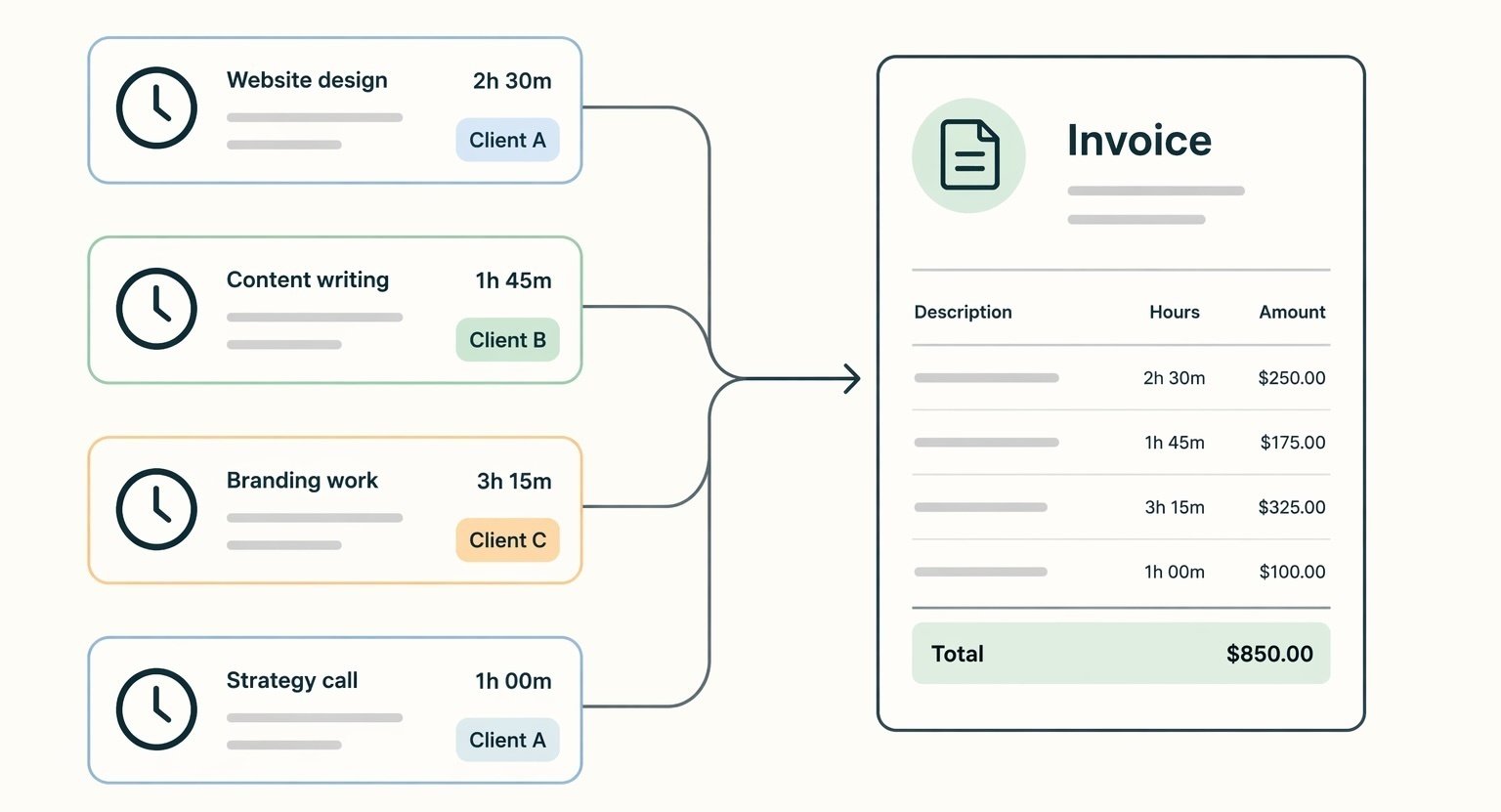
What makes a time tracker different when billing is the point?
When time tracking is just for productivity awareness, almost any tool does the job. When every tracked hour is meant to turn into a line on a client invoice, the bar is different. You need to know which client, which project, whether the work was billable, and whether it has already been invoiced. A tool that lets you log quickly but dumps everything into one undifferentiated list creates more work than it saves at billing time.
The difference shows up in small moments. Log three hours on a video call without tagging the client, and you will spend time in three weeks trying to figure out who that call was for. Do that across five clients for a month and the invoice becomes a reconstruction project instead of a five-minute task.
A billing-oriented time tracker keeps client context in the entry from the start. Hours are reviewable by client, filterable by billing status, and ready to move toward an invoice without extra steps in between. That is the distinction worth caring about when evaluating tools. Reviewing by client rather than by project is what keeps that step to a single move, a shift we walk through in switching to client-based review.
Where hours disappear between tracking and invoicing
The real failure point for most freelancers is not tracking - it is the handoff between tracking and billing. Hours get logged. Then invoicing starts and the entries do not map cleanly to what needs to go on the invoice.
The most common breakdown patterns are predictable: time logged without a client label so sorting at invoice time means reading descriptions and guessing; tracked hours in one tool and draft invoices in a spreadsheet that never quite match; no consistent way to mark hours as billed, so the same entries nearly get invoiced twice or left off entirely; and end-of-month reconstruction that takes as long as a full working day.
Consider a freelancer managing five clients. They close out October and open their time tracker. They have 80-plus entries across the month, a mix of calls, writing, revisions, and admin. Some entries say "client meeting" with no client name. A handful have no description at all. Two entries look identical but one was for a client on retainer and one was internal. Getting the invoice right now requires cross-referencing a calendar, reading emails, and making judgment calls on what to include. That friction is not a discipline problem - it is a workflow design problem.
The fix is not stricter habits. It is a tool that makes the right thing - tagging the client, marking as billable - the default behavior rather than an optional step.
Who fits which kind of setup
The right setup depends less on brand and more on how you bill, how many clients you juggle, and whether invoicing needs to happen inside the same workflow. A cleaner way to think about it is to split freelancers into parallel billing setups.
Freelancers billing a few clients hourly
If you work with a small number of clients on hourly retainers or recurring projects, you do not need a heavy platform. You need fast logging, clear client organization, and a monthly invoice path that does not require three extra cleanup steps. You are not managing team timesheets or complex project hierarchies. A lighter tool handles this better than a full project management suite ever will. Timen fits here - hours go in with a client tag, a weekly review catches gaps, and the invoice path stays clean without extra admin in the way.
Freelancers running a full solo-business workflow
Some freelancers run a more complex practice with proposal templates, contracts, automated payment reminders, retainer agreements, and client communication workflows. That is a different need from time tracking with invoicing attached. Bonsai and HoneyBook both cover this end of the spectrum. Time tracking is included, but the real value is in the contracting and client management flow. They are heavier tools and priced accordingly. Worth it if you need the full stack. Overkill if you mostly want to track hours and send a clean invoice.
Freelancers doing mostly fixed-price work
If most of your projects are fixed-price, the connection between tracked hours and invoicing matters differently. You may still want to track time for scope awareness, profitability, or difficult client conversations, but the billing path is not built around approved billable hours in the same way. Tools like Toggl Track or Clockify handle this fine. The invoicing connection is optional rather than central, and that is an acceptable trade-off when billing is flat-rate.
Freelancers who already invoice elsewhere
Some freelancers already have a reliable invoicing workflow in FreshBooks, Wave, or QuickBooks and do not want to replace it. In that case, the time tracker does not need native invoicing as long as the handoff is dependable and does not create manual cleanup every month. Separate tools can work well here, but only if the export or integration is clean enough that tracked hours do not need to be rebuilt by hand.
Best options for freelancers by use case
Rather than a ranked list, the more useful framing is: which tool fits which billing workflow? Here is how the main options break down.
| Tool | Best for | Not ideal for | Invoicing in the same workflow | Complexity |
|---|---|---|---|---|
| Timen | Freelancers billing a few clients hourly | People who need contracts, proposals, and a full client management stack | Yes | Low |
| Harvest | Freelancers who need reporting, multiple rates, and project depth | Very simple solo workflows with only a few recurring invoices | Yes | Medium |
| Bonsai / HoneyBook | Freelancers running a full solo-business workflow | People who just want simple time tracking and invoicing | Yes | High |
| Toggl Track / Clockify | Tracking-first workflows with invoicing handled elsewhere | Freelancers who want the cleanest possible path from tracked hours to invoice in one tool | Limited / secondary | Low to medium |
Simple hourly billing with a small client list
For freelancers who bill a handful of clients each month and want the lightest possible workflow, Timen is built for exactly this. You log time against a client, review it weekly to catch missed entries, and the approved hours are ready for invoicing without cleanup. There is no setup overhead trying to configure features you will never use. If your main need is tracking and billing without admin weight, this is the straightforward choice.
Full solo-business workflow
Bonsai is the most complete option for freelancers who want contracts, proposals, invoicing, and time tracking in one place. It handles the entire client engagement lifecycle, not just the time capture piece. HoneyBook covers similar ground and leans slightly more toward the client relationship and communication side. Both are worth the cost if your practice has enough complexity to justify the tooling - multiple clients, contract management, recurring billing, and payment follow-up. If you are mostly logging hours and sending a monthly invoice, neither earns its price.
Project depth with invoicing built in
Harvest sits in the middle of the market. It has strong project-level tracking, rate configurations, reporting, and a functional invoicing feature. The tradeoff is that it can feel overbuilt for a solo freelancer with a simple client list, and the per-seat pricing adds up if you bring on collaborators. It earns its cost when you have multiple active projects at different rates and need detailed reports alongside invoicing.
Tracking only, invoicing handled elsewhere
If you already have a reliable invoicing setup in FreshBooks, Wave, or QuickBooks, you may not need that built into your time tracker at all. Toggl Track and Clockify both handle tracking well without forcing you into their invoicing features. The key is that the handoff between tools needs to be dependable - if you are exporting hours to a spreadsheet and rebuilding them into an invoice manually, you are back to the same invoice reconstruction problem. Make sure the integration between tools is clean enough that nothing gets lost in transit.
The short decision: combine tracking and invoicing in one tool if you bill multiple clients hourly and want a clean month-end workflow. Only keep them separate if your accounting tool already handles invoicing reliably and the connection between the two is solid.
Quick answers for freelancers deciding on a time tracker
- Can I use one tool for time tracking and invoicing as a freelancer?
- Yes. Several tools support both in one workflow. Timen, Harvest, Bonsai, and HoneyBook all let you track time and generate invoices without switching tools. The right one depends on how complex your billing needs are.
- Is Toggl good for freelancers who also invoice clients?
- Toggl Track is strong for tracking but its native invoicing is limited. Most freelancers who bill through Toggl send data to a separate tool like FreshBooks or Wave. If you want tracking and invoicing in one place, a tool built around the billing workflow is a better fit.
- What is the simplest way to go from tracked hours to a client invoice?
- Tag every time entry with a client from the start, review entries weekly to confirm what was billable, then generate the invoice from those approved hours. The fewer steps between the time log and the invoice, the less chance something gets lost.
The gap between tracking and invoicing is where most freelancers lose money
The best time tracker for a freelancer who invoices is the one that closes the gap - client context at the moment of entry, a weekly review habit to catch gaps before they become invoice problems, and a clean path from approved hours to a sent invoice. The tool matters less than whether those three things are in place.
If your client list is small and billing is straightforward, start with the lightest tool that connects tracking to invoicing. Do not buy a full freelance business suite to solve a problem that a simpler workflow would fix. Add complexity only when the billing workflow genuinely demands it.
If you want to start with the simple end of the spectrum, Timen is built around exactly this tracking and review loop - log time by client, review it weekly, move clean hours toward billing.